Operational Workflow Upgrades
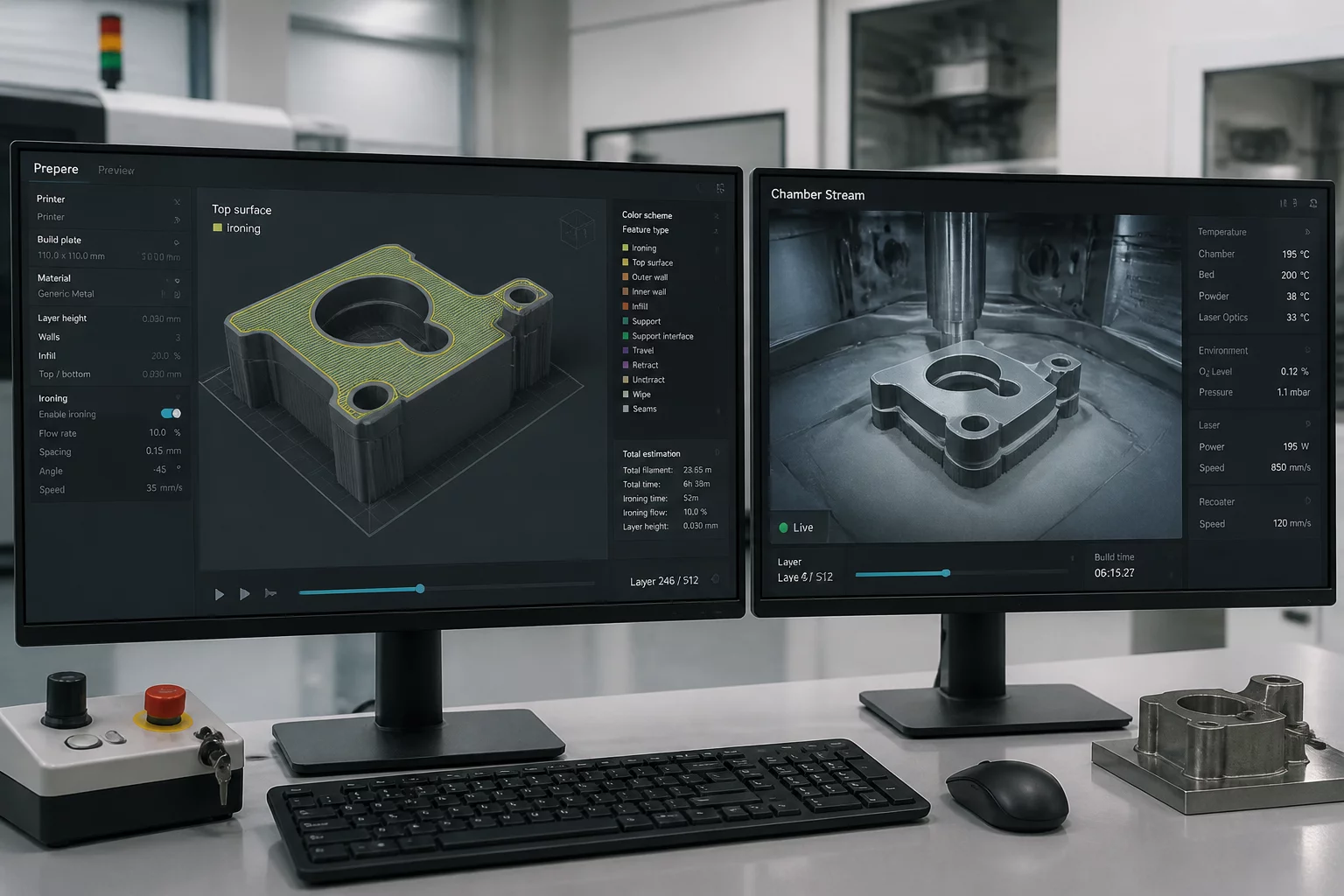
The Bambu Studio v2.8.2.x maintenance branch introduces notable refinements for day-to-day workshop operation, targeting video latency handling in the Device tab and iron surface generation on fine mechanical contours.
Key Engineering Highlights in Build v2.8.2.x
- Independent Video Pipeline: The chamber live feed rendering loop operates asynchronously from the primary 3D viewport canvas, eliminating frame drops during live camera inspections.
- Ironing Perimeter Compensation: A recalculation pass adjusts thermal dwell and micro-flow rates near thin outer walls, preventing molten material overflow along delicate perimeter boundaries.
- Per-Object Ironing Scope: Operators can assign distinct ironing line spacings, angles, and speeds to selective objects on a crowded build plate without forcing global recalculation.
- Sub-Second Status Refresh: MQTT telemetry updates for nozzle thermistors and heated bed elements reflect instantly in the monitoring console, minimizing communication lag during active prints.
Slicing Mechanics Deconstructed
Understanding how build telemetry interacts with localized slicer parameters helps maintain repeatable production quality across varied engineering materials.
Previous builds frequently exhibited interface stalls when switching between the G-code preview slice screen and the Device monitor tab while streaming HD video. Release v2.8.2.x decouples the WebRTC playback engine from main thread layout calculations, delivering smooth video display even during background slicing jobs.
Operators gain direct access to camera frame rate toggles, low-light compensation sliders, and instant snapshot triggers without navigating nested modal dialogs. This responsiveness proves essential when diagnosing early-layer adhesion issues remotely.
- Hardware-accelerated video decoding minimizes local workstation CPU overhead during long multi-plate monitoring sessions.
- A dedicated toggle isolates LAN-only camera streaming from cloud-routed feeds for strict laboratory firewalls.
- Real-time timestamp overlays synchronize physical print defects directly against toolpath layer indices in the log monitor.
Ironing smooths top solid layers by moving a heated nozzle tip over extruded plastic with minimal flow. In earlier releases, small corner vertices often accumulated excess molten polymer, creating rough burrs that required manual post-processing.
The revised v2.8.2.x routine calculates dynamic acceleration profiles when approaching exterior perimeters, tapering extrusion volume proportionately to velocity deceleration. The resulting top layer exhibits uniform matte or gloss sheen across continuous geometries.
- Micro-flow calibration preserves delicate embossed text without filling hollow cavities or engraved letters.
- Configurable inset distances prevent the nozzle boundary from melting already-aligned outer contour perimeters.
Production setups frequently arrange structural brackets alongside aesthetic display faceplates on the same build plate. Imposing global ironing parameters increases total cycle time needlessly on parts where surface gloss serves no functional purpose.
In this version, selecting an individual model allows setting custom ironing flow percentages, pattern angles, and speeds without overriding the project-wide default configuration. Adjacent structural components retain standard rapid top fill infills, preserving production throughput.
- Contextual parameter indicators highlight which models carry localized ironing overrides versus plate baseline inheritance.
- Modifier meshes accurately clip ironing boundaries, enabling targeted surface finishing over specific contact zones.
Upgrading slicer versions often risks desynchronizing custom filament presets or corrupting user-defined acceleration tables. The v2.8.2.x build includes an automated migration validator that confirms legacy JSON configuration schemas before applying new parameters.
Engineering teams utilizing multi-seat installations can import legacy 3MF files without unexpected parameter resets. If incompatible settings exist, the software flags specific parameter keys rather than silently reverting to generic machine defaults.
- Automated backup snapshots preserve pre-update preset libraries in the local application data directory.
- Refined G-code emission syntax maintains complete forward compatibility with legacy proprietary firmware lines.